Find football referees and fixtures that fit.
RefSorted is a football referee marketplace. Teams find match cover, and referees find fixtures that fit their availability.
How RefSorted works
Find fixtures to referee
- Set your availability
Choose your days and travel radius. Browse fixtures with kick-off, venue, referee requirements and fee shown upfront.
- Apply for a match
Read the fixture brief and apply when it suits you. The posting team reviews applications and chooses its referee.
- Get confirmed
Confirmed fixtures join your schedule. Match-contact details are shared so you can arrange the game with the team.
Find a referee for your match
- Post your fixture
Add the date, kick-off, venue, format, age group, referee requirements and offered match fee.
- Review applications
Read applications and the uploaded FA evidence. Check your competition's appointment and eligibility rules.
- Confirm a referee
Choose a referee and receive match-contact details to arrange the game directly. Posting alone does not guarantee cover.
Teams pay referees directly. RefSorted does not hold or guarantee payment. See the full booking process.
Referee workspace
Local matches, clear details.
See the fee, venue, competition and referee requirements before you claim a fixture.
Checking nearby matches
Within 15 miles of M21 7SX
Available fixtures
Weekend fixtures within your travel radius, with availability and referee requirements shown on every match.
Stated fees and requirements are shown before you claim.
Loading the map
Finding your fixtures on the map.
Browse mapped fixtures
Organiser view
Post a football fixture
Set the fee and referee requirements. Eligible local FA referees will be notified immediately.
Your posted fixtures
Confirmed schedule
Your confirmed fixtures and match-day contact details in one place.
At a glance
Your schedule
Select a day to see your confirmed fixtures.
Confirmed
Completed
Mon
Tue
Wed
Thu
Fri
Sat
Sun
Referee workspace
Your fixture run
Completed match fees and the fixtures you have refereed through RefSorted.
Completed match fees
Recorded after completion
£0 platform fee
Referee activity
Your RefSorted record
Completed fixtures will build your record here.
All completed match fees
No entriesYour FA evidence
Upload evidence of your current FA registration. Organisers reviewing your application can inspect the screenshot you supplied.
Your credentials
1 of 2 addedProfile and location
CompleteYour name, home postcode, and travel radius help match nearby fixtures.
Your referee detailsFA referee registration
Not addedUpload one clear screenshot of your current-season FA referee registration.
Helps organisers assess your applicationHow evidence review works
An approved RefSorted operator records only whether the upload is appropriate FA evidence. RefSorted does not authenticate the document or its claims.
FA registration guide
Open FA My Account (opens in a new tab)
Find your referee record
Your referee record lives in FA My Account. RefSorted needs one clear screenshot showing your current registration, pathway level and registered County FA.
Sign in to your FA account
Use the account connected to your referee registration. RefSorted never receives your FA password or sign-in details.
Scroll to the Referee section
On the account page, find Referee. Check that the newest season says Registered, then confirm the level and County FA shown underneath. Keep any youth registration line visible if your account shows one.
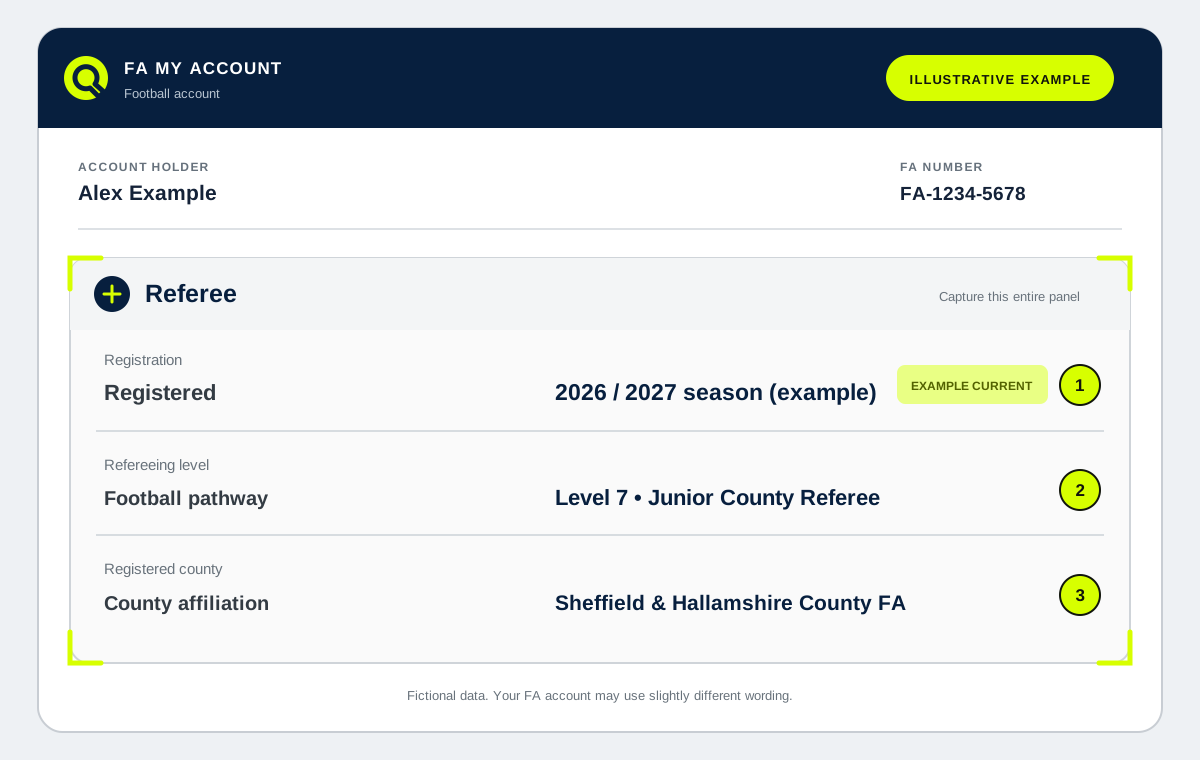 Open example full size (opens in a new tab)
Take one clear screenshot
Capture the full Referee panel with your name and full FA number visible. Crop only unrelated sections of the account page.
Current seasonThe newest season and Registered status are readable.
Referee levelYour current football pathway level is visible.
County FAYour registered County FA is visible.
Youth status, if shownKeep any youth registration or category line in the capture.
Before you upload
Use PNG, JPEG or WebP up to 5 MB. Do not upload identity documents, certificates or unrelated account pages.